
A listener wrote in: DSF files from PureDSD Batcher had a loud pop at the start and end of every track. The same disc, extracted with Pine Player Pro or SACD Ripper GUI with DSF no-pad checked, did not.
We traced the files and the playback path. The short version:
The audio was not extracted incorrectly. DSF, by spec, fills out the end of a song with a little blank padding. Some players play that padding as DSD and you hear a click. Others stop at the real music length, and the same file is silent at the edges.
So we will not make “no padding” the default — that would change everyone’s files to work around a subset of players. The right product move is: keep spec-compliant extracts by default, and add a DSF no-pad option for the playback chains that click.
🛠 What is actually happening
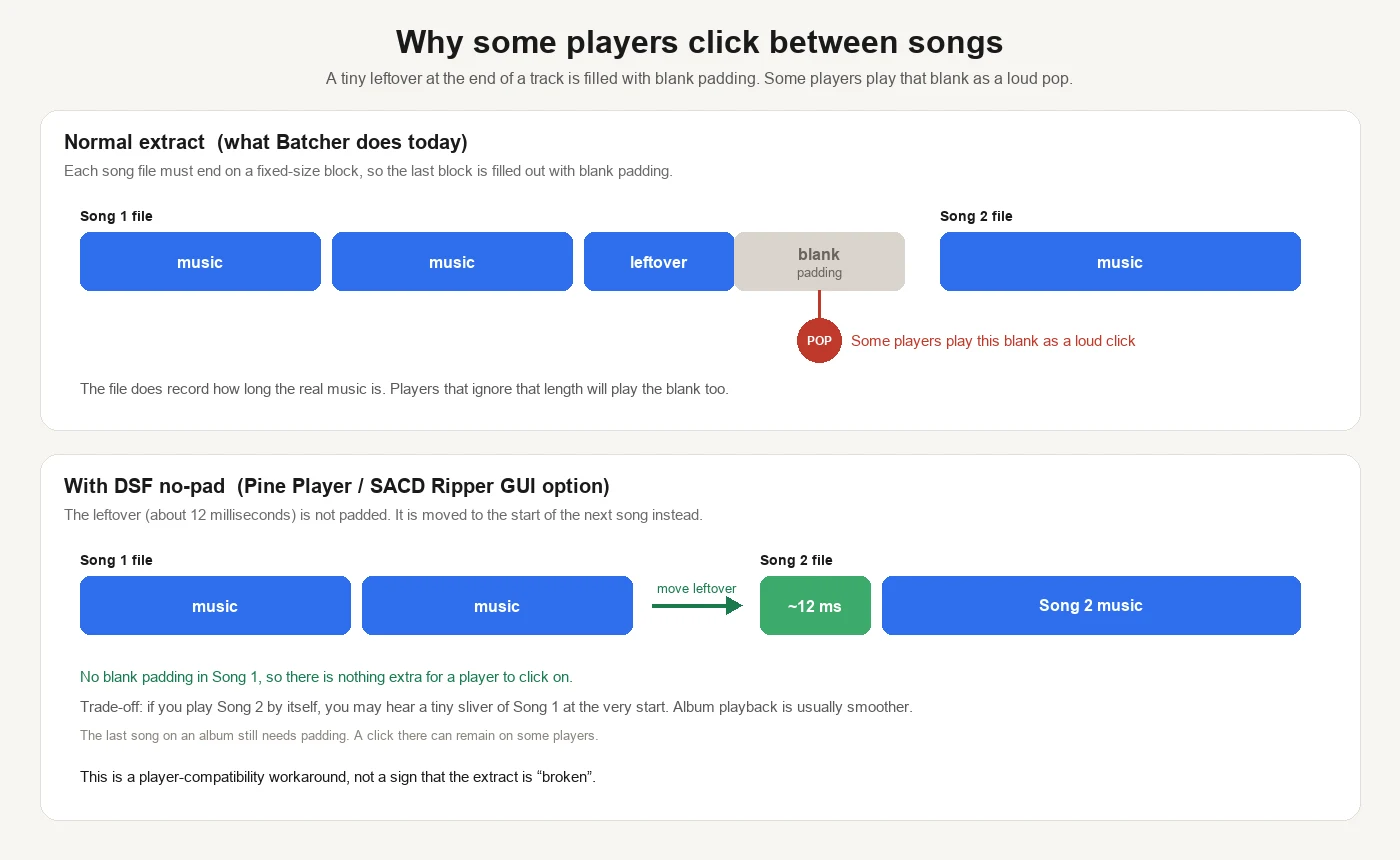
DSF requires each song to end on a fixed-size block. A track rarely fills that last block exactly, so the remainder is padded with blank data.
The file also records how long the real music is. Players that honor that length never play the pad. Many players, DACs, and gapless implementations still decode the whole last block. Blank DSD is not silence — it is a jump in the bitstream — so you hear a pop.
It is not universal. Single-track playback on a player that truncates at the music length is often fine. Gapless album playback, or hardware that feeds whole blocks to the DAC, is more likely to click. The listener’s A/B — Batcher versus a no-pad tool, same player — matches this exactly.
📊 What no-pad changes in the file
No-pad is not a message to the player saying “skip the blank.” It changes what is on disk: the leftover that would not fill a block (about 12 milliseconds) is moved to the start of the next song instead of being padded in this one.
Song 1 then ends on a full block of real music. There is almost no blank left for a naïve player to click on.
| Player that stops at the music length | Player that plays the whole last block | |
|---|---|---|
| Normal extract (spec padding) | Fine | Plays the blank → click |
| DSF no-pad | Also fine; boundaries shift by ~12 ms | No blank → usually no click |
The trade-off is equally concrete:
- Play song 2 alone, and you may hear a sliver of song 1 at the very start.
- Play song 1 alone, and the ending is shorter by that same sliver.
- Play the album through, and it is often smoother.
- The last song still needs padding (there is no next track to carry into), so a click can remain at the end of an album on some setups.
No-pad is a compatibility workaround for sensitive players. It is not proof that the extractor “broke” the music.
Why an option, not a new default
The format asks for that last block to be filled. Turning padding off for everyone would reshape every library to accommodate some players.
Plenty of players never click. Those listeners want predictable DSF that matches cover duration and track splits. Making no-pad the default would change files for people who had no problem.
The split is simple:
- Default: extract to spec. Same default as most GUI tools.
- DSF no-pad on: move those ~12 ms to the next track, for players that play padding as sound.
This is the same product call as channel selection: do not disturb the majority; put a real pain point behind a switch, instead of calling it a bug and flipping the default.
✅ What we will do
- [x] Confirm the current extract fills the last block as the DSF spec requires
- [x] Compare with Pine Player / SACD Ripper GUI no-pad behavior
- [x] Confirm the click depends on the player, not on every device
- [ ] Add a DSF no-pad option in PureDSD Batcher, off by default
- [ ] Re-extract when that option is on; already-finished jobs will not be skipped in silence
Files already extracted will not change by themselves. For albums that click, turn the option on and run again. Keep the ISO masters; DSF can always be rebuilt.
⏳ If you hear the pop today
A short isolation list:
- [ ] Does the same DSF still click in another player?
- [ ] Single-track play, or only when the album runs through?
- [ ] Both ends of every song, or mainly where two songs meet?
- [ ] Does the DAC briefly fall back to PCM between tracks? (That is a different, hardware handoff click.)
Write us with the player and DAC you use. The model names tell us whether no-pad is the right lever, instead of mixing padding, DoP dropouts, and relay clicks into one story.
PureDSD Batcher’s job is steady batch extraction, with the choice in your hands: clean and spec-compliant by default; no-pad when your playback chain actually needs it.