Creating pure professional value across audio, imaging, and AI workflows

Efficient Lab crafts high-quality audio tools, imaging utilities, and AI productivity apps. We encapsulate extreme technical complexity into stable, intuitive, and long-lasting digital tools.

Current public lineup

15 / 15 Apps

Audio governance & processingLive
Apple
Windows

Local music and sound-effect asset manager for Mac and Windows: AI tagging, batch organizing, safe writeback

PureLab

PureLab is for music collectors, DJs, producers, and sound designers. It scans your local music library and asset library, analyzes BPM, key, genre, mood, instruments, and true source quality on your machine, then hands the results back as drafts for you to confirm before writing them into the files. Batch renaming, CJK text conversion, artwork and lyrics embedding, BWF metadata, UCS classification, and Excel round-trips all happen in the same workbench. Every writeback is logged in history: roll back a single file or restore the whole library from a snapshot. New in 6.0: AI Assistant lets you issue organizing commands in plain language with your own model key.

  • Two workbenches: music library and asset library — The music library and the sound-effect asset library are managed separately, each with its own views and columns. Mount multiple disks and folders; the virtualized table scrolls, multi-selects, and edits smoothly with hundreds of thousands of rows.
  • Local audio analysis — Computes BPM, key, and Camelot code; AI tags genre, sub-style, mood, and instruments. Take the top guess or the top three. Analysis depth can be quick sampling or segmented full-track analysis.
PureLab · Local music and sound-effect asset manager for Mac and Windows: AI tagging, batch organizing, safe writeback
Audio governance & processingLive
Apple
Windows

Local stem separation for Mac and Windows: split a song into vocals, accompaniment, drums, bass, and more

PureSpleeter

PureSpleeter takes a finished song and separates it into individual stems. You can split out just vocals and accompaniment, get four tracks with vocals, drums, bass, and other instruments, or go further and isolate guitar and piano for six stems. The separation model installs with the app and all processing happens on your computer, so it works offline too. Queue a whole folder for processing, or drive it from the command line in your own scripts. Paid download; everything is included after purchase.

  • Vocal / Accompaniment (2 stems) — Splits into a vocal file and an accompaniment file. Enough for backing tracks, cover recordings, and sing-along practice.
  • Standard 4-stem — One track each for vocals, drums, bass, and other instruments. Good for transcribing, remixing, or practicing along without the drums or bass.
PureSpleeter · Local stem separation for Mac and Windows: split a song into vocals, accompaniment, drums, bass, and more
Audio governance & processingLive
Apple
Windows

Local voice denoising and de-reverb for Mac and Windows

PureRefine

PureRefine handles two common problems in voice recordings: background noise (wind, air conditioning, electrical hum, keyboard clicks) and room reverb (echo in empty rooms and meeting rooms). Pick a file, check denoise, de-reverb, or both, and it produces a new audio file while the original stays untouched. The AI model runs on your computer; it downloads once on first use and works offline after that.

  • Voice Cleaner (denoise) — Removes constant background noise and ambient sound behind speech, such as wind, insects, air conditioning, electrical hum, and keyboard clicks, while keeping the detail of the voice itself.
  • Reverb Remover (de-reverb) — Reduces echo from empty rooms and untreated meeting rooms, making the voice sound closer to the microphone.
PureRefine · Local voice denoising and de-reverb for Mac and Windows
Audio governance & processingLive
Apple
Windows

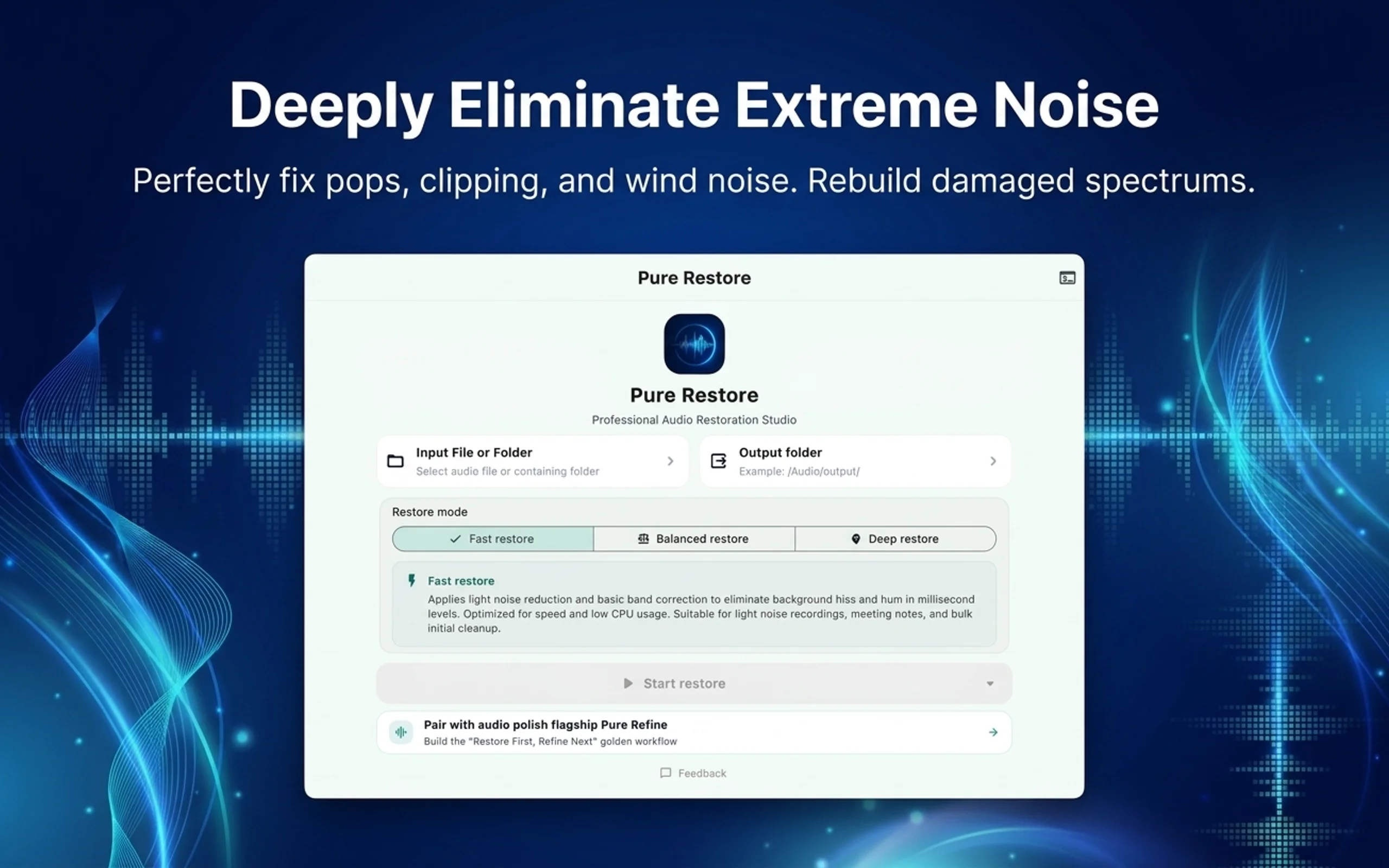
Local audio restoration for Mac and Windows: repair recordings with hiss, noise, and missing frequency ranges

PureRestore

Some recordings have more than a bit of noise: poor equipment, low bitrates, cut-off highs, heavy hiss and noise floor make them sound muffled and muddy. PureRestore uses an AI model to rebuild the missing and damaged parts of these recordings so the voice becomes clear again. It offers three restoration modes and handles single files or whole folders. The model installs with the app, all processing happens on your computer, and no network is needed.

  • High-frequency restore — Filters out high-frequency noise and hiss first, then applies standard restoration. Worth trying first on recordings with obvious hiss or electrical whine.
  • Balanced restore — The default mode: standard restoration, suitable for everyday work on most recordings.
PureRestore · Local audio restoration for Mac and Windows: repair recordings with hiss, noise, and missing frequency ranges
Audio governance & processingLive
Apple
Windows

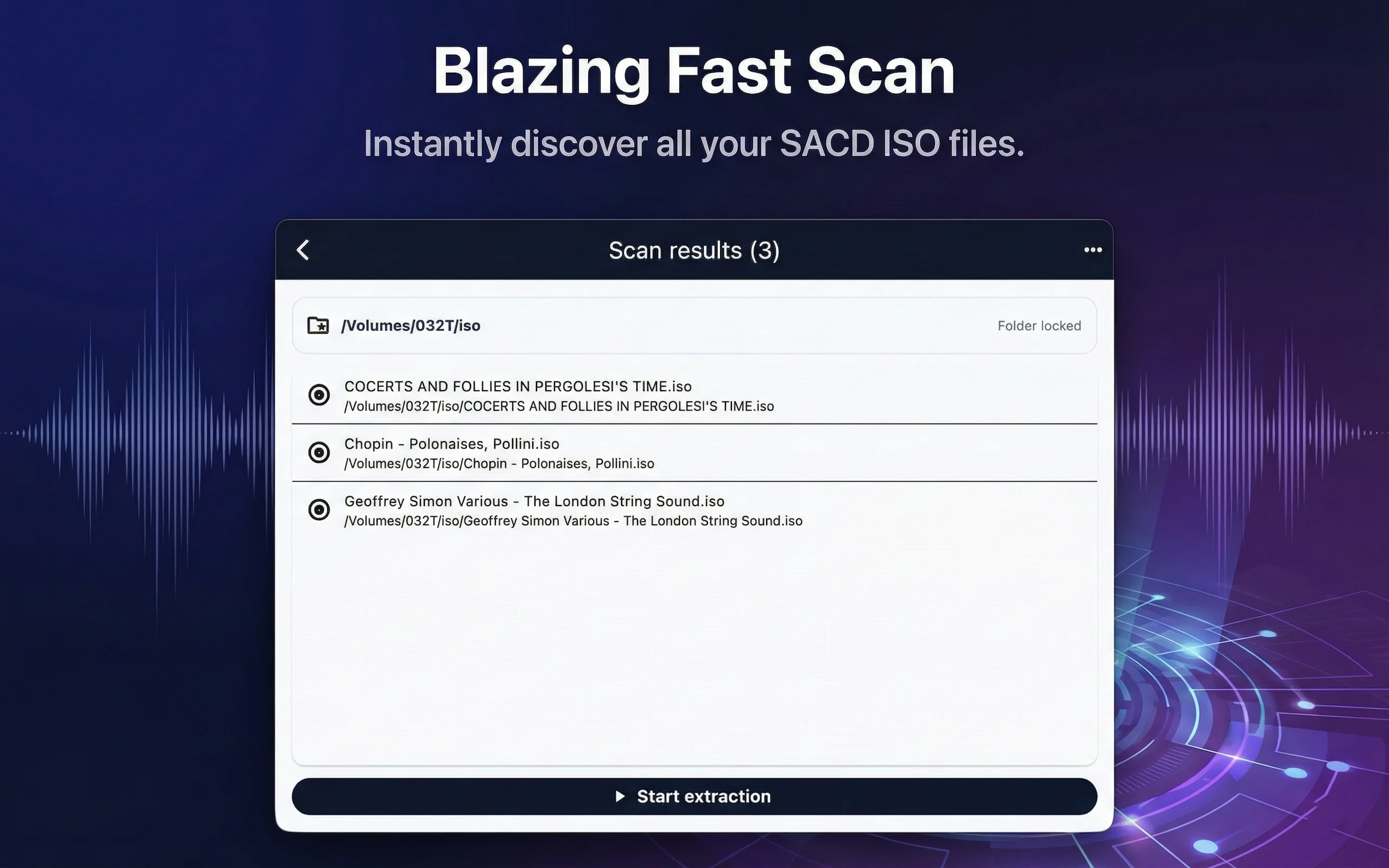
Batch-extract a whole folder of SACD ISOs into tagged DSF files

PureDSD Batcher

PureDSD Batcher extracts SACD ISO images into DSF files. Pick a folder and it finds every ISO inside, queues them, and extracts them one at a time. Each ISO's output lands in a separate folder next to it: DSF tracks, a CUE file, and tags written as ID3v2.4, ready for your player to read. ISOs that extracted successfully are skipped automatically next time. Everything happens locally; no network and no account needed.

  • Folder batch extraction — Select or drop in a folder; the app scans it for SACD ISOs and starts extracting them in a queue as soon as the scan finishes.
  • Steady serial queue — Only one ISO is extracted at a time; the next starts after the current one finishes, avoiding parallel disk access that slows down drives or causes errors.
PureDSD Batcher · Batch-extract a whole folder of SACD ISOs into tagged DSF files
Playback & conversionLive
Apple

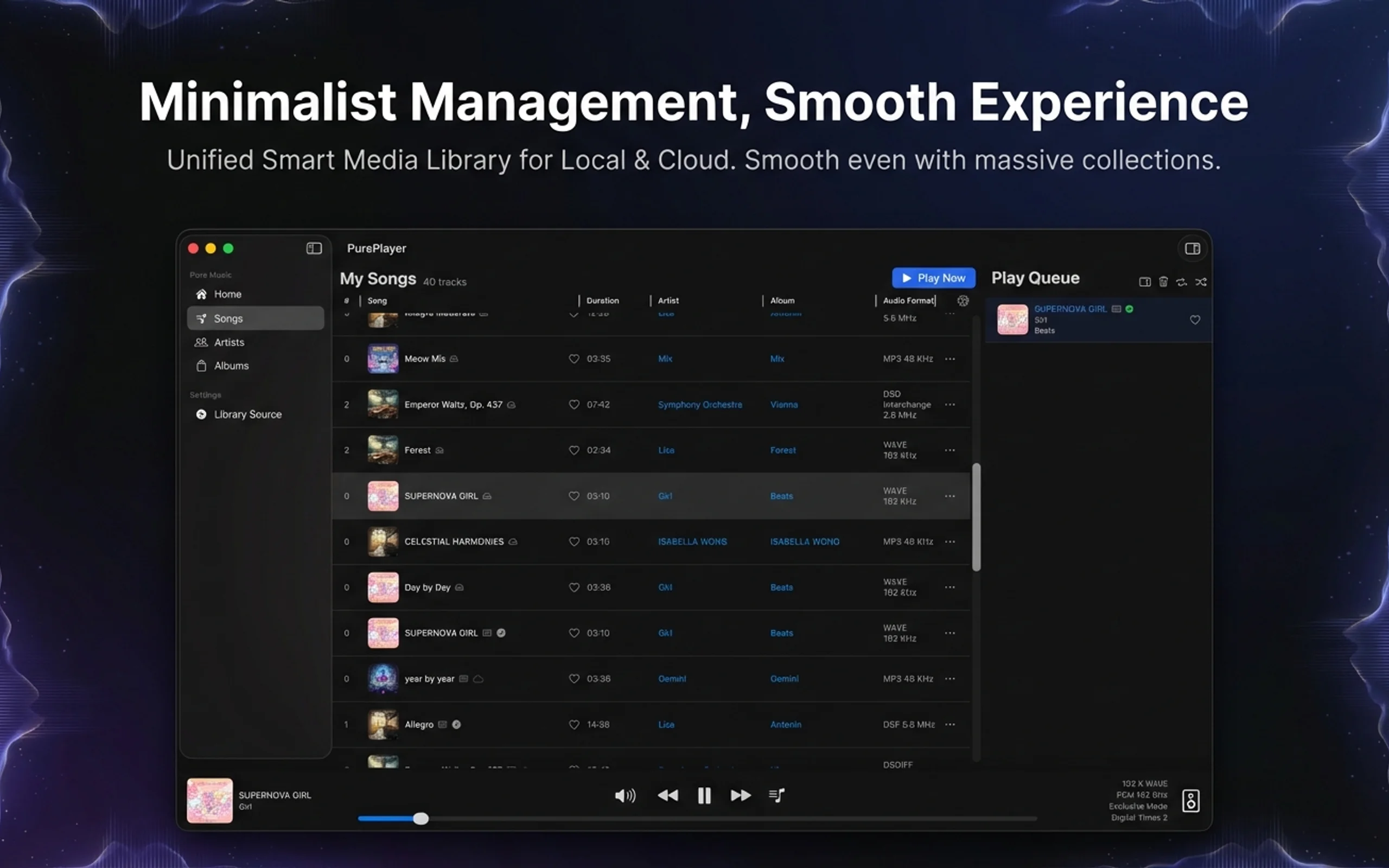
Hi-Res local music player for iPhone, iPad, and Mac, with Bit-Perfect, DSD, and NAS / cloud library support

PurePlayer Hi-Res

PurePlayer plays your own music files from local folders, NAS, WebDAV, SMB, Google Drive, and Baidu Netdisk. Version 6.0 rebuilt the interface and the performance core, so a library of a hundred thousand tracks still scrolls and searches smoothly. It supports Bit-Perfect output, native DSD passthrough, gapless playback, and a parametric equalizer, and includes Chat with Music, which picks tracks from your library into the queue when you describe a mood or a scene in one sentence.

  • Interface rebuilt — 6.0 gives iPhone, iPad, and Mac one shared visual language. Playback gestures, list layouts, capsule pickers, and empty-state guidance were all reworked, so even a large library stays easy to navigate.
  • Performance rebuilt for large libraries — Library scanning, sorting, and filtering all run on background threads. Play-all and queue restore are planned in bounded windows instead of loading the whole library into memory at once. Browsing and search stay responsive on six-figure collections.
PurePlayer Hi-Res · Hi-Res local music player for iPhone, iPad, and Mac, with Bit-Perfect, DSD, and NAS / cloud library support
Playback & conversionIn development
Apple
Windows

Music Server

PureStream

PureStream turns your Mac or Windows computer into a private music server. Your audio files stay in their original folders and are never uploaded to the cloud. Listen away from home without a public IP, domain, DDNS, router port forwarding, or certificates: pair PurePlayer with a 6-digit PIN and connect over a direct WireGuard tunnel. Local playback, library scanning, web playback, and tag editing need no subscription. (Currently in development)

  • Remote Access with PIN Pairing — Pair PurePlayer on iPhone or iPad with your Mac or Windows computer using a 6-digit PIN. The connection is a direct peer-to-peer WireGuard tunnel with no relay server, so you can listen away from home without a public IP, domain, DDNS record, port forwarding, reverse proxy, or certificate. Up to two players are bound by default; remote access is the only feature that requires a subscription. Connectivity depends on both networks and their NAT types, and some strictly restricted networks may not connect.
  • Audio Format Coverage — Index and stream 50+ audio extensions, including FLAC, MP3, M4A/M4B/ALAC, WAV, AIFF/AIF, OGG/OGA/Opus/Speex, DSF, DFF, WMA, APE, WavPack (WV/WVP), TAK, MKA, WebM, MPC, SHN, TTA, AC-3/E-AC-3, DTS/DTS-HD, TrueHD/MLP, AMR, AU, CAF, W64, VOC, and GSM. DSD is supported in both DSF and DFF containers; when converted to PCM, DSD is downsampled by integer power-of-two ratios within the same family.

Use case

Music collectors with large local high-resolution libraries who want their files and listening habits kept off commercial cloud services

Imaging & AIIn development
Apple

On-device photo cleaner for iPhone and iPad: find similar photos, duplicates, screenshots, and large files to organize (in development)

LumiSweep

LumiSweep analyzes your photo library locally on your iPhone or iPad, turning similar photos, duplicates, screenshots, quality issues, and large files into an easy-to-review checklist. Review recommendations, customize your choices, and confirm the cleanup in one go. No account required, no photos uploaded; currently in development.

  • Similar Photo Grouping & Recommendations — Groups photos with similar capture times and visual content together, providing recommendations based on technical quality such as sharpness, exposure, and facial expressions. Suggestions serve as a starting point—zoom in, inspect details, and freely adjust which shots to keep or clean up.
  • Duplicate Photo Identification — Distinguishes exact byte-for-byte duplicates from visually similar copies produced by saving, exporting, or compressing. Review suggested keepers and duplicate versions by group instead of hunting for duplicates across thousands of photos.

Use case

People with numerous burst shots and similar photos who want to cut down time spent comparing pictures one by one

Imaging & AILive
Apple
Windows

On-device AI photo culling for Mac and Windows: find duplicates, near-duplicates and rejects, keep the best frame

LumiSift

LumiSift cleans up a photo folder: it finds duplicate and similar photos and sorts them into groups, flags blurry, overexposed and underexposed rejects, then you decide which frame each group keeps. Quick Scan handles thousands of photos in seconds; Prime Mode uses an AI vision model to spot similar shots taken from different angles and in different light. All computation runs on your machine; rejected photos move to a trash folder in the same directory, so you can always get them back. The subscription tier also ships a command-line tool you can plug into a photography post-production pipeline.

  • Quick Scan — Uses perceptual hashing to sweep thousands of photos in seconds and find exact duplicates, resized or lightly edited copies. Groups are sub-divided once more so that any two photos in a group really are similar.
  • Prime Mode — An AI vision model extracts image features and recognizes photos of the same scene from different angles, in different light and with similar framing. Similarity comes in high, medium and basic tiers; drag the threshold slider looser or stricter and groups update instantly. The model installs with the app; no extra download is needed.
LumiSift · On-device AI photo culling for Mac and Windows: find duplicates, near-duplicates and rejects, keep the best frame
Imaging & AILive
Apple
Windows

Local-first AI photo management for Mac and Windows: diagnosis, cleanup, people recognition and metadata

LumiLab

LumiLab is built for photography enthusiasts and people with years of family photos. It indexes your photos where they already live (it doesn't move, copy or upload the files), then runs a diagnosis of the whole library: how many duplicates, similar shots, bursts and screenshots there are, and how much space you could free. From there you can clean up by quality and similarity, group photos by person with face recognition, and batch-edit titles, tags, copyright and more. All AI inference runs on your machine; metadata is written to XMP sidecar files next to the photos, the originals are never touched, and every change can be undone.

  • Library diagnosis — Add one or more photo directories (they can span several drives). After the background scan you get a diagnosis: photo and video counts and space used, date range, format distribution, camera and lens statistics, duplicate groups and extra photos, similar groups, screenshots, burst groups, reclaimable space and named people. Every item jumps straight to the matching cleanup or browse page.
  • Cleanup (Cull) — Scores each photo on overall sharpness, exposure, face sharpness, eye sharpness, closed eyes and aesthetics, and groups by similarity. Set how many photos or what percentage each group keeps, define blur and exposure reject rules, use built-in presets like Balanced, Sharpness-first and Portrait-first, or import and export your own scoring rules.
LumiLab · Local-first AI photo management for Mac and Windows: diagnosis, cleanup, people recognition and metadata
Playback & conversionLive
Apple
Windows

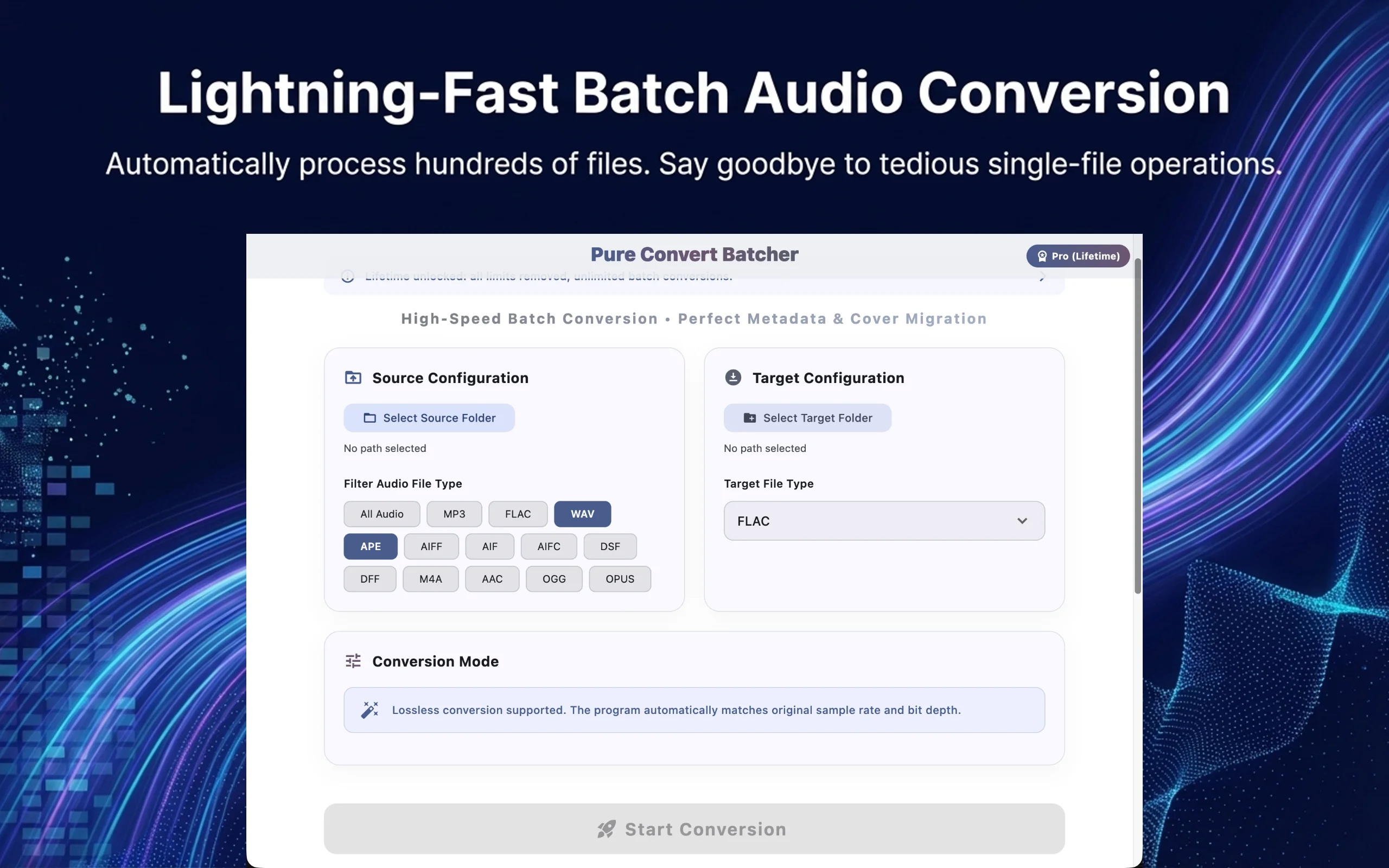
Free batch audio converter: convert a whole library while keeping tags, covers, and DSD-to-PCM support

PureConvert Batcher

PureConvert Batcher batch-converts the music in a folder into another format, keeping the subfolder structure exactly as it was and copying tags and covers along. It outputs MP3, FLAC, M4A, WAV, OGG, Opus, and AIFF, and can turn DSD (DSF / DFF) into PCM at your choice of sample rate and bit depth. When an intact file with the same name already exists at the target, it gets skipped, so repeated runs never redo work. Completely free, with no count or usage limits, and all processing stays on your machine.

  • Whole-folder batch conversion — Pick a source folder and a target folder; every subfolder is scanned recursively, and the output keeps the same directory structure at the target.
  • Seven output formats — MP3, FLAC, M4A, WAV, OGG, Opus, AIFF. Input supports all of those plus AAC, APE, and DSD (DSF / DFF).
PureConvert Batcher · Free batch audio converter: convert a whole library while keeping tags, covers, and DSD-to-PCM support
Privacy & data toolsLive
Apple

An offline allergen checker for iPhone: photograph the ingredient list, see whether it contains what you avoid

InGuard

InGuard is an iPhone app. Take a photo of the ingredient list on a package, or pick one from your photo library, and it recognizes the text on the device, then compares it against the allergens you set and tells you which ingredients match, which look suspicious and which were not found. A built-in keyword pack covers 14 common allergen families, and you can create separate profiles for yourself, children and family members. With Pro you can also add your own keywords. Recognition and matching happen entirely on the phone: no network, no account.

  • Photograph the ingredient list — Aim the camera at the ingredient list, or pick a photo from the library. On-screen guidance (aim, move closer, fit the whole list in frame, hold still) triggers the shot automatically and opens the result.
  • Allergen matching — Recognized text is split into three parts: the ingredient list, advisory statements (such as "may contain"), and other text. It is then compared against your enabled allergens, with results sorted into found, possible and not detected.
InGuard · An offline allergen checker for iPhone: photograph the ingredient list, see whether it contains what you avoid
Privacy & data toolsLive
Apple
Windows

Find private photos in your library on-device and move them where you want. Works on iPhone, Mac and Windows

Private Photo Move

Private Photo Move scans your photos with an on-device AI model, finds private photos containing nudity, and moves them to a folder or external drive you choose. On iPhone it scans the system photo library and can hide the found photos in one tap, or collect them into a separate album. Detection only targets private imagery with nudity; ID photos and ordinary portraits are not selected. Everything runs on your device: no network needed, photos are never uploaded.

  • On-device AI detection — The detection model installs with the app and runs on your device. Nothing to download, no network needed. It only detects private imagery containing nudity; ID photos and ordinary portraits are out of scope.
  • Folder scanning (Mac / Windows) — Pick a folder and it scans every image inside. During the scan it shows files scanned, files found, detection speed and estimated time left.
Private Photo Move · Find private photos in your library on-device and move them where you want. Works on iPhone, Mac and Windows
Playback & conversionLive
Apple
Windows

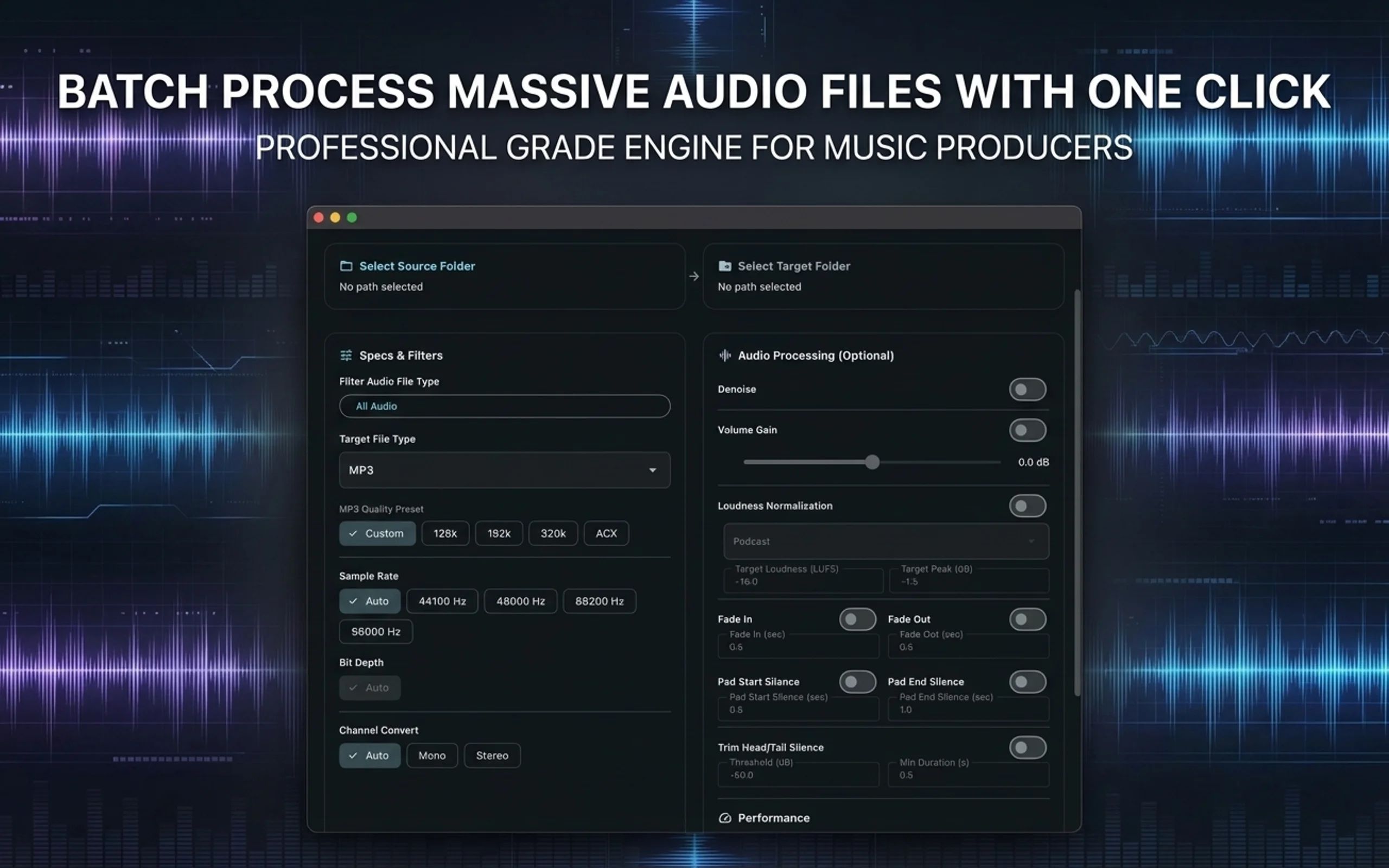
Batch audio processing for delivery: convert formats while denoising, normalizing loudness and trimming silence, plus a CLI

PureConvert Pro

PureConvert Pro adds the processing you usually do before delivery to PureConvert Batcher's batch transcoding: denoise, head/tail silence trimming, fades, padding, channel conversion, volume gain and loudness normalization. Loudness presets cover podcast, streaming, broadcast and ACX audiobooks, or set your own target loudness, true peak and loudness range. Parameters set in the interface can be copied as a command line; subscribers can run the whole pipeline inside scripts and automation.

  • Batch transcoding — Everything PureConvert Batcher does: whole folders processed in batch with the directory structure preserved, seven output formats, tags and artwork copied along, DSD-to-PCM, and finished files skipped automatically.
  • Loudness normalization — Presets for podcast (-16 LUFS), ACX audiobooks (-20 LUFS), music streaming (-14 LUFS) and broadcast (-23 LUFS), or set your own target loudness, true peak and loudness range.
PureConvert Pro · Batch audio processing for delivery: convert formats while denoising, normalizing loudness and trimming silence, plus a CLI
Privacy & data toolsLive
Windows

Helps Windows users leave personal OneDrive safely: free check, download cloud files in place, copy Desktop and Documents back, verify to 0 missing, then guide the stop-backup steps

SafeExit for OneDrive

When OneDrive backup takes over your Desktop, Documents, and Pictures, many files quietly end up living only in the cloud, leaving behind just placeholder icons on your PC. If you disconnect OneDrive then, those files become unreadable. SafeExit for OneDrive starts with a free check to show you which files are cloud-only, which ones can't be read, and whether your disk has enough room. Once you decide to leave, it downloads cloud-only files into their existing OneDrive folders as real local files, copies Desktop, Documents, and Pictures back to their default locations (or a location you choose), verifies every file down to 0 missing, and then guides you through Microsoft's official stop-backup and OneDrive shutdown steps. It never deletes any of your source files.

  • Free check — Scans your personal OneDrive in read-only mode. Clearly lists cloud-only files, unreadable files, path issues (like junctions, over-long paths, and case-only name clashes), and whether you have enough disk space. You can export a Markdown summary for free.
  • Exit plan — Lays out a clear plan from the check: which files need downloading, where each managed folder will be copied back, and how much extra space is required. Nothing changes until you confirm.
SafeExit for OneDrive · Helps Windows users leave personal OneDrive safely: free check, download cloud files in place, copy Desktop and Documents back, verify to 0 missing, then guide the stop-backup steps

Need more custom solutions?

If you are looking for custom dev, AI integration, or core system refactoring, we can help.

Work with the studio